
Your fastest options for tonight: Skribbl.io for a party crowd, Tank Game for quick two-player chaos, and ROTATION for tight, low-lag three-player tactical runs. All three load in a tab, all three support private rooms, and none of them ask you to install anything. Open a link, share a code, and you're in.
TL;DR:
- Most browser co-op games require only a shareable link and a private room code, taking around two minutes to set up for a small group.
- Wired internet connections and disabling VPNs or firewalls significantly reduce lag and disconnections during gameplay.
- Chrome and Firefox are the most reliable browsers for desktop, but each may have specific controller compatibility quirks worth checking beforehand.
- Browser games built for speed and volume, like Tank Game or io shooters, prioritize quick joining, while games like ROTATION focus on strategic, coordinated play.
- Using private rooms instead of public matchmaking enhances safety, reduces disruptions, and improves the overall experience of casual multiplayer sessions.
Table of Contents
- What Are the Best Browser Co-op Games to Play With Friends?
- How Do You Set Up a Private Co-op Session With Friends?
- Which Browsers, Devices, and Controllers Work Best?
- How Do You Reduce Lag in Browser Co-op Games?
- Where Can You Find More Browser Co-op Games?
- What Internet Speed Do You Need for Smooth Co-op Play?
- Why Do Browser Co-op Sessions Break, and How Do You Fix It?
- Is It Safe to Play Browser Co-op Games Online?
- What I've Learned Running Quick Co-op Sessions With Friends
- Ready to Try ROTATION With Your Group?
- Sources
What Are the Best Browser Co-op Games to Play With Friends?
Every entry below runs directly in your browser tab. No client, no patch, no wasted Saturday night staring at a progress bar. That instant-play format is exactly why browser-based multiplayer keeps winning against downloadable clients for casual groups: friction kills game nights, and a link you can paste into a group chat removes almost all of it.
- Skribbl.io — a drawing-and-guessing party game built for six or more people. Best for: loud group chats and mixed skill levels. Standout feature: instant public or private rooms with a shareable code. To start: pick "Create Private Room," set the word list, and drop the link in your chat.
- Tank Game — a scrappy top-down shooter built for two players who want something fast and dumb in the best way. Best for: quick pickup sessions with one friend. Standout feature: private lobbies with short invite codes that skip account creation entirely. To start: generate a room, copy the code, send it, done.
- ROTATION — a tactical survival horror shooter with a single-player Story Mode and private co-op rooms for up to three players. Best for: small squads who want real stakes and coordinated tactics instead of button-mashing. Standout feature: host-centered WebRTC connections that cut out extra hops between players, which matters once you're relying on a teammate to watch your back mid-encounter. To start: launch a private room, share the code, choose your loadout.
- An itch.io web co-op pick — indie developers upload short, experimental co-op projects tagged specifically for browser play. Best for: players who want something weird and different from mainstream picks. Standout feature: many list controller support and known quirks right in the project description. To start: filter by the Web and Co-op tags, then hit "Run game."
- A quick-pickup .io shooter or shared-lobby game — the genre built entirely around joining a match in under ten seconds. Best for: filling five minutes between other plans. Standout feature: no lobby setup at all, just a shared server browser. To start: pick a region and click "Play."
If your group wants coordination over chaos, ROTATION is the pick built for it. Everyone else on this list is built for volume and speed instead.
How Do You Set Up a Private Co-op Session With Friends?
Getting a private room running takes about two minutes once you know the sequence.
- Open the game's link in your browser.
- Choose "Create Room" or "Host Lobby" instead of joining a public match.
- Set the room to private, and adjust difficulty or match settings if the game offers them.
- Copy the invite link or lobby code and send it to your group.
- Have one friend join first and test movement, chat, and controls before the rest pile in.
Most connection failures trace back to three culprits: blocked third-party cookies, a browser permission prompt you dismissed without reading, or a VPN and firewall combo that's quietly dropping the connection. Clearing site permissions and disabling the VPN for the session fixes the majority of these on the first try.
Pro Tip: Test the room in a private or incognito tab with just one friend before you invite the whole group. It isolates whether the problem is your setup or theirs, and it saves you from troubleshooting five people at once.
Which Browsers, Devices, and Controllers Work Best?
Desktop is still the safest bet for browser co-op. Chrome and Firefox both handle the vast majority of web-based multiplayer titles without issue, though the two aren't always interchangeable when a controller enters the picture.
Some developers document real quirks worth knowing before you start. One indie co-op project's own README flags a Joy-Con compatibility problem specific to Chrome and recommends Firefox instead for players using that controller. It's a small detail, but it's the kind of thing that saves you twenty minutes of "why isn't my controller working" during a session.
- Desktop: Chrome or Firefox cover most titles; check any game-specific notes if you're using a Joy-Con or less common controller.
- Mobile: touch controls work for lighter puzzle and party games but struggle in anything requiring precise aim or fast reaction, like tactical shooters.
- Tablets: a middle ground for point-and-click co-op titles, less ideal for twitchy action.
- Controllers: map your buttons and test movement and camera controls in an empty lobby before your friends join.
- Keyboard fallback: know your key cluster (WASD plus nearby action keys) in case a controller drops mid-session.
If your group leans mobile, steer toward puzzle or party formats. Save the tactical, precision-heavy titles for whoever's on a keyboard, mouse, or controller.
How Do You Reduce Lag in Browser Co-op Games?
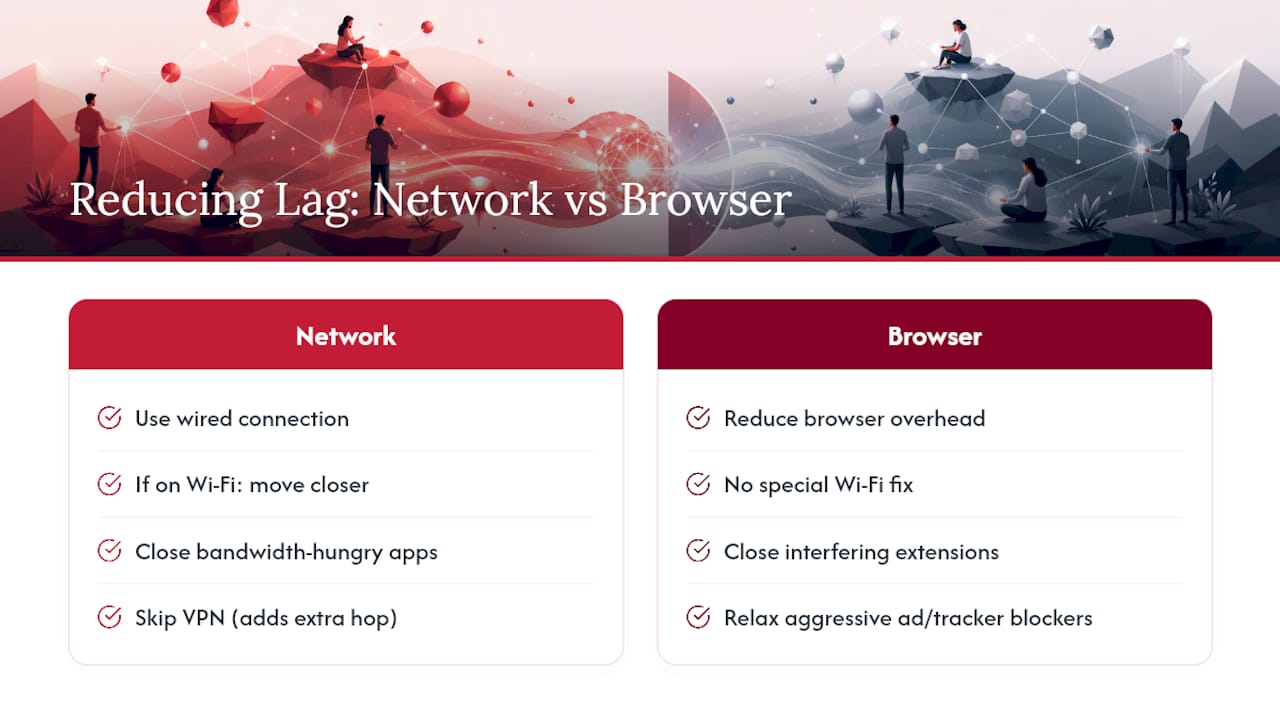
Lag in browser co-op almost always comes down to one of two things: your connection or your browser's overhead. Fix those and most disconnect problems disappear.
On the network side, a wired connection beats Wi-Fi every time for real-time co-op, and if Wi-Fi is your only option, get as close to the router as you can. Close bandwidth-hungry apps running in the background, and skip the VPN for the session. Direct connections are the whole point of browser co-op, and a VPN adds exactly the kind of extra hop you're trying to avoid.
Some games route your connection through fewer intermediaries by design. ROTATION's host-centered WebRTC model connects up to three players directly rather than bouncing traffic through additional servers, which is one practical way developers address the lag and disconnect complaints that plague typical browser multiplayer setups. More detail on how that works is in the section below.
On the browser side, allow any camera, microphone, or notification permissions the game requests, and temporarily relax aggressive tracker or ad blockers, since some interfere with real-time connections without you noticing.
Pro Tip: Run a quick speed test right before you start. If your upload speed is noticeably below your download speed, that asymmetry is usually the real source of the lag, not the game itself.
Where Can You Find More Browser Co-op Games?
Once you've burned through the shortlist above, three places consistently turn up new titles worth trying.
- itch.io — filter by the Web platform tag and the Co-op tag together to surface indie projects built specifically for browser play.
- CrazyGames — runs a dedicated co-op category with dozens of titles playable immediately, no account required.
- PC Gamer's curated lists — periodically updated roundups that catch newer or trending browser titles before they show up elsewhere.
Before you commit a group's evening to something new, check three things fast: does it mention private-room support, does it note any controller quirks, and does it offer an invite link or lobby code instead of forcing everyone through a public queue. If it passes those three checks, it's worth the ten minutes to try.
Bookmark whichever games become recurring favorites, and save the invite link format your group prefers. It turns "let's find something to play" into a thirty-second decision instead of a fifteen-minute scroll.
What Internet Speed Do You Need for Smooth Co-op Play?
Browser co-op games are lighter on bandwidth than most people expect. A connection around 5 to 10 Mbps down and at least 2 to 3 Mbps up handles most two or three player sessions without visible lag, since you're mostly transmitting small position and action updates rather than streaming video.
What actually matters more than raw speed is latency and stability. A fast connection with high ping, or one that drops for a second every few minutes, causes more problems than a moderate connection that stays steady. If you're on satellite internet or a heavily congested shared connection, expect stutter even if your speed test numbers look fine on paper.
For hardware, browser co-op doesn't demand much. A laptop or desktop from the last five or six years with integrated graphics runs the vast majority of these titles without strain, since the games are built to run in a browser tab rather than push dedicated graphics hardware. The bigger bottleneck is almost always your router's distance from your device, not your machine's processing power. If you're troubleshooting lag, check your Wi-Fi signal strength before you assume your computer is the problem.
Why Do Browser Co-op Sessions Break, and How Do You Fix It?
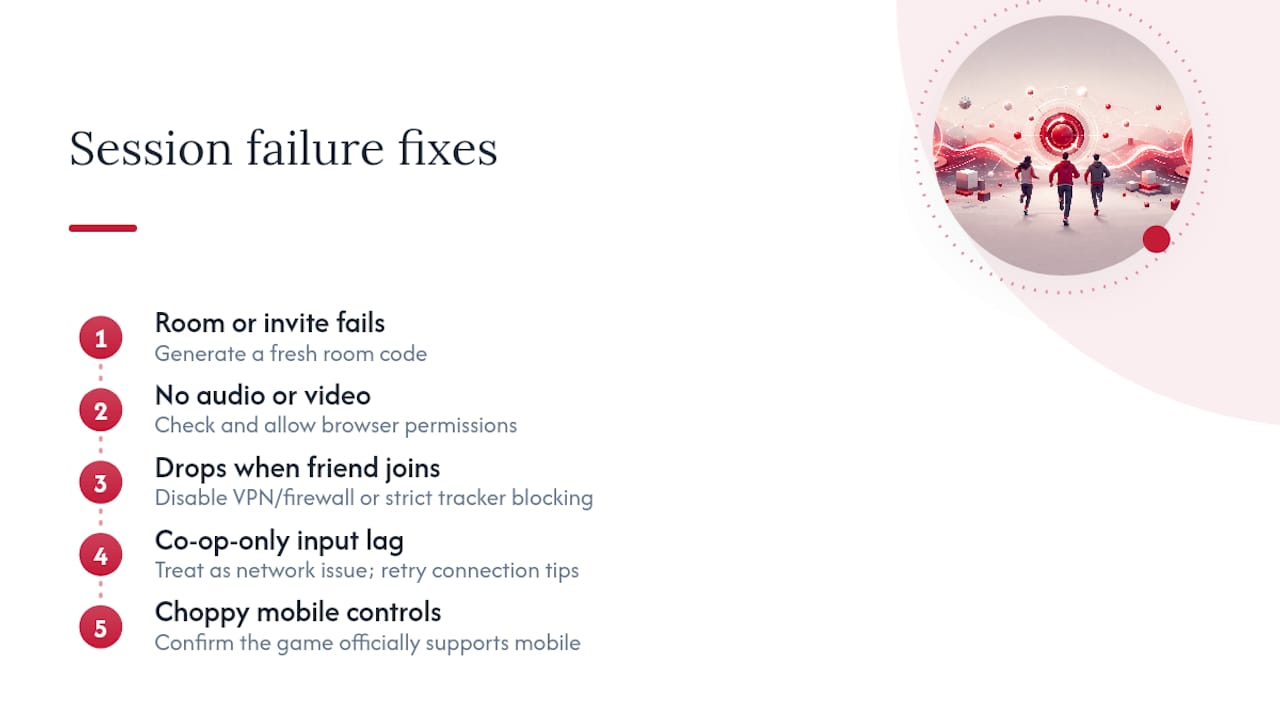
Most browser co-op headaches fall into a short list of repeat offenders. Recognizing which one you're dealing with saves you from randomly restarting things that were never broken.
The room won't load or the invite link fails. Usually a stale link or a room that timed out from inactivity. Generate a fresh code rather than reusing an old chat message.
One player can't hear or see teammates. Check browser permissions first. Most games request microphone, camera, or notification access, and a dismissed prompt silently blocks features without an obvious error message.
The game runs fine solo but drops when a friend joins. This points to a firewall, VPN, or overly strict browser privacy setting interfering with the peer connection. Temporarily disabling strict tracker blocking for that one tab usually resolves it.
Input lag shows up only in co-op, not solo play. That's a network symptom, not a game bug. Revisit the connection tips above before assuming the game itself is at fault.
Mobile players report choppy controls. Some titles simply aren't built for touch input in fast-paced modes. Confirm the game officially supports mobile before troubleshooting further.
Working through this list in order catches the vast majority of session failures before they turn into a wasted evening.
Is It Safe to Play Browser Co-op Games Online?
Browser co-op is generally low risk, but a few habits keep it that way. Most reputable titles let you join private rooms without creating an account, which is worth favoring over any game that demands an email and password just to play a five-minute match with friends.
Be selective about what you share in an invite link. Room codes and links are meant to be shared, but treat any game asking for personal details beyond a display name with suspicion, especially free titles you found through a random search rather than a known platform. Stick to established discovery sources like itch.io or CrazyGames, where content is at least moderated at the platform level.
On the browser side, keep your permissions intentional. Grant microphone or camera access only for the session you're actively playing, and revoke it afterward if your browser doesn't do so automatically. Clear cookies periodically if you play through a lot of different sites, since accumulated tracking cookies are more of a privacy nuisance than a security threat, but they add up.
Finally, watch what you say in voice or text chat with strangers in public lobbies, since that's a different risk profile than a private room with people you already know. Sticking to private rooms with a shared code, rather than public matchmaking, sidesteps most of the exposure browser co-op carries in the first place.
What I've Learned Running Quick Co-op Sessions With Friends
Some of my best short co-op sessions started as a "let's just try it for fifteen minutes" text. Once a private room replaced public matchmaking, the whole tone of the group changed. Nobody was worried about a stranger wrecking the run, and that changed how people played, more willing to take risks, more willing to actually communicate instead of just reacting.
(Author credentials and reader testimonials to be added here.)
Pro Tip: Before committing a full evening, run a 15-minute test session with one friend. It surfaces every setup problem you'll hit later, at a fraction of the frustration.
— Will
Ready to Try ROTATION With Your Group?
ROTATION pairs a single-player Story Mode with private co-op rooms, built around a host-centered WebRTC connection that links players directly instead of routing through extra servers. For a casual group tired of public lobbies full of strangers, that setup means private rooms you control, quicker responsiveness during tense encounters, and none of the install friction that keeps a game night from actually starting on time.

If your group has fifteen minutes and wants to see whether a tighter, tactical co-op format beats another round of party games, open a private room in ROTATION and invite two friends. Choose your loadout, share the code, and see how the run goes.