
The fastest way to play with friends online: pick a browser-based party or casual multiplayer game with private room links, skip the downloads, and get everyone in the same session in minutes. Play modes break down into three types: invite links, room codes, and cross-device joins from phone or laptop. For a co-op option built for small squads, ROTATION runs directly in your browser with private rooms for up to three players.
TL;DR:
- Browser-based party games with private links typically support groups from four to twelve players without requiring accounts or downloads.
- Two-player co-op games like chess can set up with almost zero delay, ideal for small duos seeking close teamwork or head-to-head matches.
- ROTATION offers private, host-centered co-op rooms for up to three players, providing the lowest lag with direct browser connections and no account barriers.
- Fast setup and short rounds, ideally 20 to 30 minutes, keep casual groups engaged and prevent game night from becoming lengthy or repetitive.
- Using a stable Wi-Fi connection, confirming device compatibility, and sharing codes confidently help ensure smooth, lag-free sessions with privacy and simple tech requirements.
Table of Contents
- Types of Online Games With Friends and What Each One Needs
- How to Set Up a Game Night: A 1-2-3 Checklist
- Cross-Platform and Tech Tips for Smoother Sessions
- Safety and Privacy: Quick Rules to Keep Sessions Pleasant
- Why ROTATION Is a Recommended Browser-First Option for Small Co-Op Sessions
- Coordinating Playtime Across Time Zones and Busy Schedules
- Free vs. Paid Access: What Friction to Expect
- How to Host a Virtual Game Night
- What Actually Keeps Group Game Nights Fun
- Start a Private Co-Op Room on ROTATION Tonight
- FAQ
Types of Online Games With Friends and What Each One Needs
Not every format fits every group. Match the game type to your squad size and gear before you commit to a session, or you'll spend more time troubleshooting than playing.
Here's how the main categories break down:
- Drawing and party games. Fast rounds, 4 to 12 players, almost always browser-friendly with room codes or shareable links. Nobody needs an account.
- Casual .io and arcade-style games. Player counts flex from 2 to dozens, and entry friction is close to zero. You click a link and you're playing.
- Two-player co-op and versus games. Best suited for a duo who wants tight teamwork or head-to-head competition instead of a crowd. Chess sites like Lichess let two friends set up a private game in seconds, no download required.
- Board-game ports and social deduction. Slower pacing, often 20 to 45 minutes per round, and some require a free account to save progress or track stats across sessions.
Reddit threads on browser gaming consistently point casual groups toward instant-play links and .io-style titles precisely because nobody wants to explain an install process to five friends on a group call. Party platforms like Gaming Couch push this further by turning phones into controllers, so the only screen that matters is whoever's hosting.
For co-op specifically, ROTATION fits between the party-game category and the deduction category: private rooms, teamwork-based challenges, and no account wall before you start.
How to Set Up a Game Night: A 1-2-3 Checklist
Getting a group from "let's play something" to actually playing usually takes longer than the game itself. Cut that dead time with a short sequence.
- Pick the format and confirm devices. Count heads, confirm who's on phone versus laptop, and choose a game that matches your smallest common device.
- Host creates the room and shares the code once. Drop the link or code in a single chat message, then spend two minutes confirming everyone's audio and controls work before the round starts.
- Set the ground rules fast. Agree on round length, scoring, and whether mics stay open or push-to-talk, before anyone starts playing for real.
If someone can't join through the direct link, fall back to a screen share or a shared voice channel so they're not locked out of the fun entirely. Target five to fifteen minutes from "let's play" to actually being in-game. Anything longer and half your group will start checking their phones.
Pro Tip: Have the host test the room alone for sixty seconds before inviting anyone. Catching a broken link before your friends do saves the whole session from an awkward false start.
Cross-Platform and Tech Tips for Smoother Sessions
Browser games are built to run anywhere, but "anywhere" has limits worth knowing before game night starts.
- Chrome and Firefox handle most party and casual titles cleanly; Safari and older phones sometimes lag on graphics-heavy .io games.
- A native app helps when you want offline access or push notifications for scheduling. For everything else, the browser works fine and skips the install screen.
- App wrappers for browser game catalogs, like CrazyGames on the App Store and its Google Play counterpart, give mobile access without asking players to load a full desktop site.
- Fix lag by closing background apps, sticking to the 5GHz Wi-Fi band when possible, and reloading the tab if input feels delayed.
- Add voice through Discord or Google Meet when the game itself has no chat, but skip video calls for anything fast-paced. Video adds latency you don't need when split-second timing matters.
Safety and Privacy: Quick Rules to Keep Sessions Pleasant
Private rooms beat public matchmaking for mixed groups. A stranger dropping into your trivia night isn't worth the risk of exposing your link publicly. Use guest mode when it's offered. It skips account creation, though you'll lose saved progress between sessions. Have your host confirm the room code out loud or in a trusted chat, never paste passwords or personal details into public game chat, and turn on content filters when younger players are joining in.
Why ROTATION Is a Recommended Browser-First Option for Small Co-Op Sessions
ROTATION runs on host-centered WebRTC, which means the host's browser connects directly to each teammate instead of routing everything through a distant server. Fewer hops mean less lag and fewer dropped connections, the two things that kill a co-op session fastest.
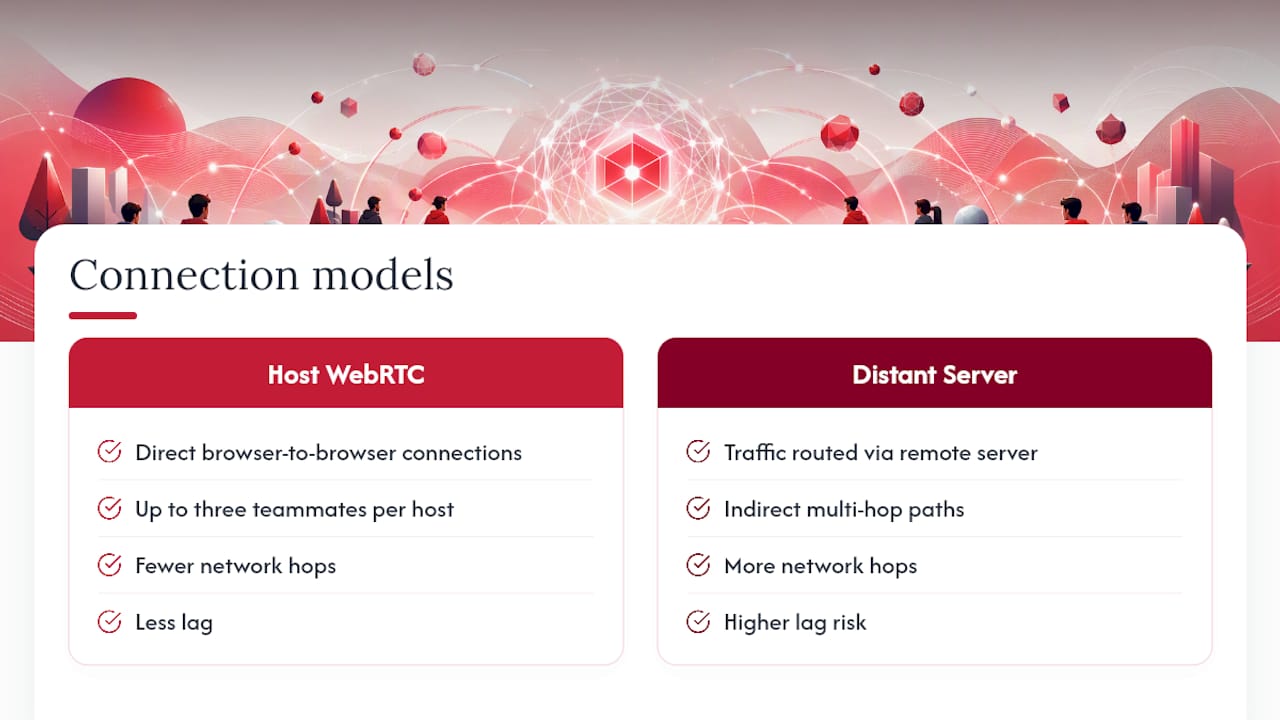
The practical setup: open the browser, launch a private room, and up to three players connect directly using a shared code. No download, no account wall to clear first. Play solo through a story mode when you want to scout the environments alone, then bring friends into the same save for cooperative runs against the game's enemy encounters.
To try it: visit the ROTATION landing page, start a private room, and send the code to your co-op partners. You're in a session before the coffee gets cold.
Coordinating Playtime Across Time Zones and Busy Schedules
A three-hour time zone gap kills more game nights than bad internet does. Fix scheduling before you fix anything technical.
Pick one fixed slot that repeats weekly rather than negotiating a new time every session. "Fridays at 8 PM Eastern" survives; "let's figure it out this week" usually doesn't. Use a shared calendar link or a pinned message in your group chat instead of relying on memory across four different time zones.
For groups split across continents, rotate the inconvenient slot. If one friend always has to stay up late, that resentment builds fast and quietly. Swap who takes the odd hour every few weeks.
Shorter formats absorb schedule friction better than long ones. A 20-minute trivia round survives someone joining late; a 90-minute board-game port doesn't. If your group spans more than two time zones regularly, default to games with quick rounds so a late arrival doesn't derail everyone else's night.
Async check-ins help too. A quick "you free Thursday?" poll sent a day ahead beats a same-day scramble where half the group has already made other plans.
Free vs. Paid Access: What Friction to Expect
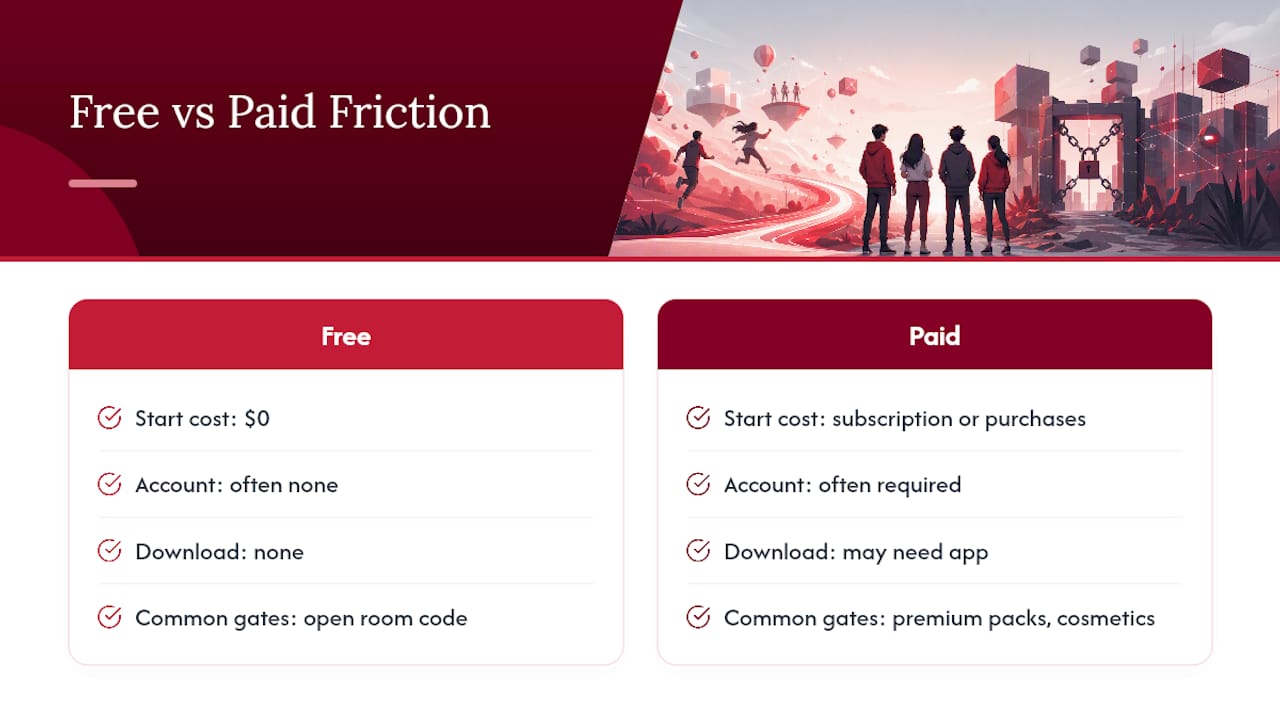
Most browser party and casual games cost nothing to start. That's the entire appeal: click a link, get a room code, play. No credit card, often no account, and no waiting on an app store download to finish before your friends get bored and leave the call.
Paid friction shows up in specific places. Some quiz and trivia platforms gate premium question packs behind a subscription. Some .io games sell cosmetic upgrades that don't affect gameplay but can affect your wallet if you're not paying attention. Account creation itself is the quieter cost. It's not money, but it's a barrier: every extra sign-up screen loses a percentage of your group before the game even starts.
The general pattern holds across the platforms worth using: browser-first access with no mandatory account gets people playing fastest, and any paid layer sits on top as optional rather than required. ROTATION follows the same shape right now. Story mode and private co-op rooms are free to access, with room for optional paid features or upgrades down the line as the game grows.
If your group is deciding between two similar games, the one requiring zero downloads and zero accounts will always win on turnout. Casual groups don't tolerate friction well, and they shouldn't have to.
How to Host a Virtual Game Night
Hosting isn't complicated, but skipping a step turns a fun night into a technical support call. Assign roles before you start: one person hosts and shares the room code, one person tracks time if the game doesn't do it automatically, and everyone else just shows up ready.
Timing matters more than people expect. Block 45 to 60 minutes for a casual session, even if the games themselves run shorter. That buffer covers the inevitable five minutes of "wait, how do I join" chaos at the start.
Device setup takes thirty seconds if you do it right: confirm your browser is updated, close any tabs eating bandwidth, and test your mic before the group call starts, not during it. If you're using phones as controllers for a party game, make sure everyone's device is charged past 20 percent. A dead phone mid-round is the least dramatic way to lose a player.
Keep a simple rotation for who hosts each week. Spreading that responsibility keeps one person from burning out on setup duty, and it means the group learns multiple formats instead of defaulting to whatever the same host always picks.
What Actually Keeps Group Game Nights Fun
Short rounds beat long ones, almost every time. The groups that keep coming back are the ones swapping games every 20 to 30 minutes, not grinding through a single long session until someone quietly closes their laptop. Rotating who hosts matters too. It keeps the format fresh and stops one person from carrying all the setup work every week.
The biggest mistake casual groups make is treating game night like ranked competition. Keep the vibe social. My one rule: if someone hasn't spoken in a few rounds, switch games. Silence usually means boredom, not focus.
— Will
Start a Private Co-Op Room on ROTATION Tonight
You've got the formats, the setup checklist, and the tech fixes. ROTATION gives you a place to actually use them: a browser-based option built specifically for small co-op crews who want direct, host-connected play instead of routing through distant servers that add lag every step of the way.
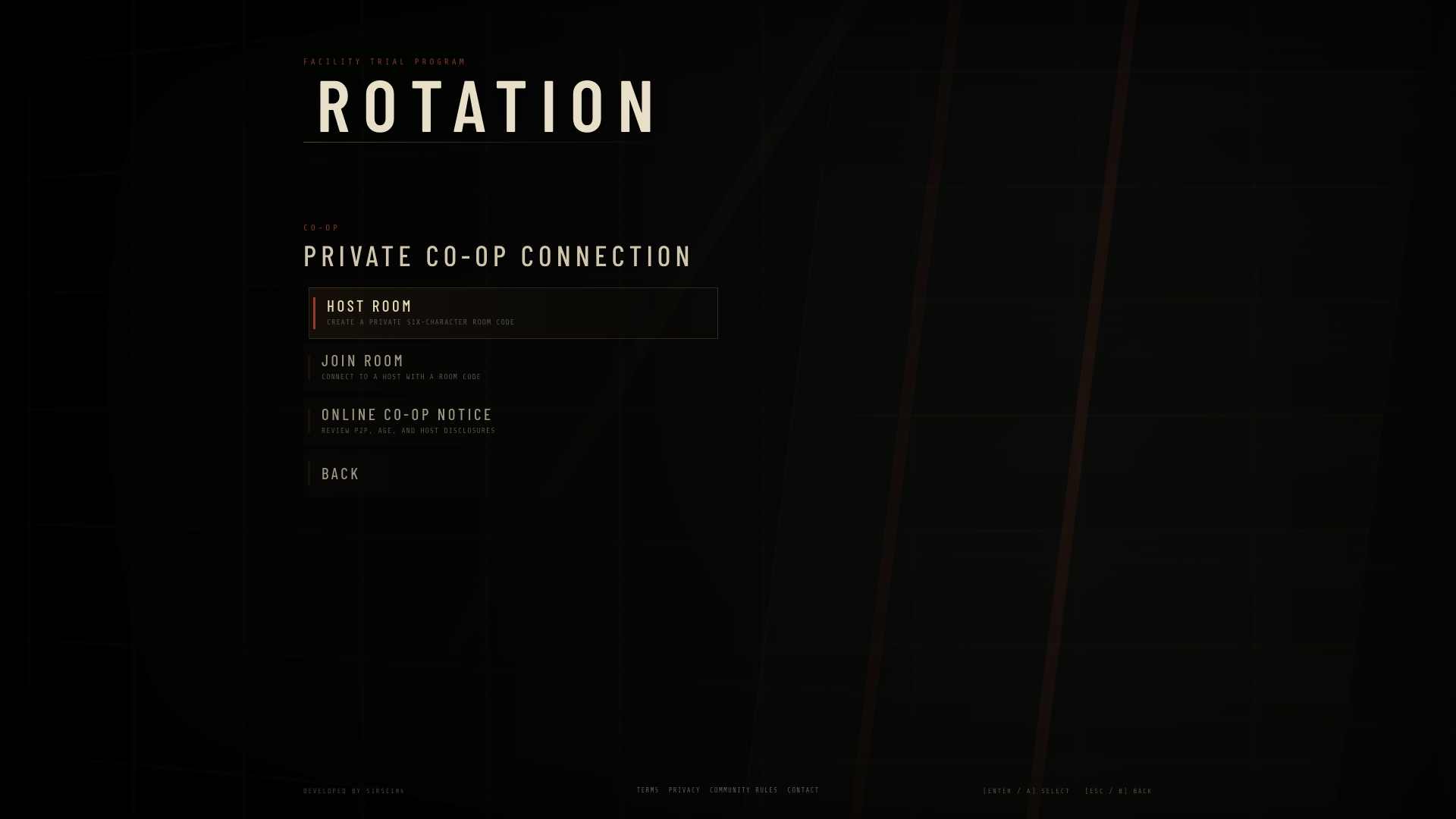
The recap is simple. Browser access means no download screen standing between you and your friends. Private co-op rooms mean up to three players connect on a shared code, nobody else. Host-centered WebRTC means the connection runs directly between you and your teammates instead of bouncing through extra hops.
Getting started takes less time than reading this sentence took. Visit the ROTATION landing page, open a private room, and send your room code to whoever you're playing with tonight. Story Mode and co-op rooms are free to access right now, with room for optional paid upgrades as new features roll out. Grab your code and get in the room.
FAQ
Which Game Is Best for Playing With Friends Online?
There's no single best option since it depends on group size and pacing, but browser-based party games with private room codes tend to win for casual groups because they need zero downloads. For small co-op crews of two or three, ROTATION's private rooms are built specifically for that format.
What Are Good Two-Player Games to Play Online?
Chess through a site like Lichess is a reliable free option for two players who want a real-time, no-download match. Two-player co-op formats also work well when you want teamwork rather than head-to-head competition.
What Are the Best Online Games for Groups Right Now?
Casual .io games, browser party platforms, and hosted trivia rooms consistently top group recommendations because they run instantly with no account required. For groups wanting a cooperative challenge instead of a party format, ROTATION's private co-op rooms fit that gap.
What Free Online Party Games Can I Play With Friends?
Browser-based charades and drawing games, along with quiz platforms like Quizio, run entirely free with no download. Most only need a shared room code to get everyone playing within a couple of minutes.